> ## Documentation Index
> Fetch the complete documentation index at: https://docs.oleander.dev/llms.txt
> Use this file to discover all available pages before exploring further.
# Redpanda
> Stream Redpanda topics into your oleander Iceberg catalog with a Redpanda Connect pipeline.
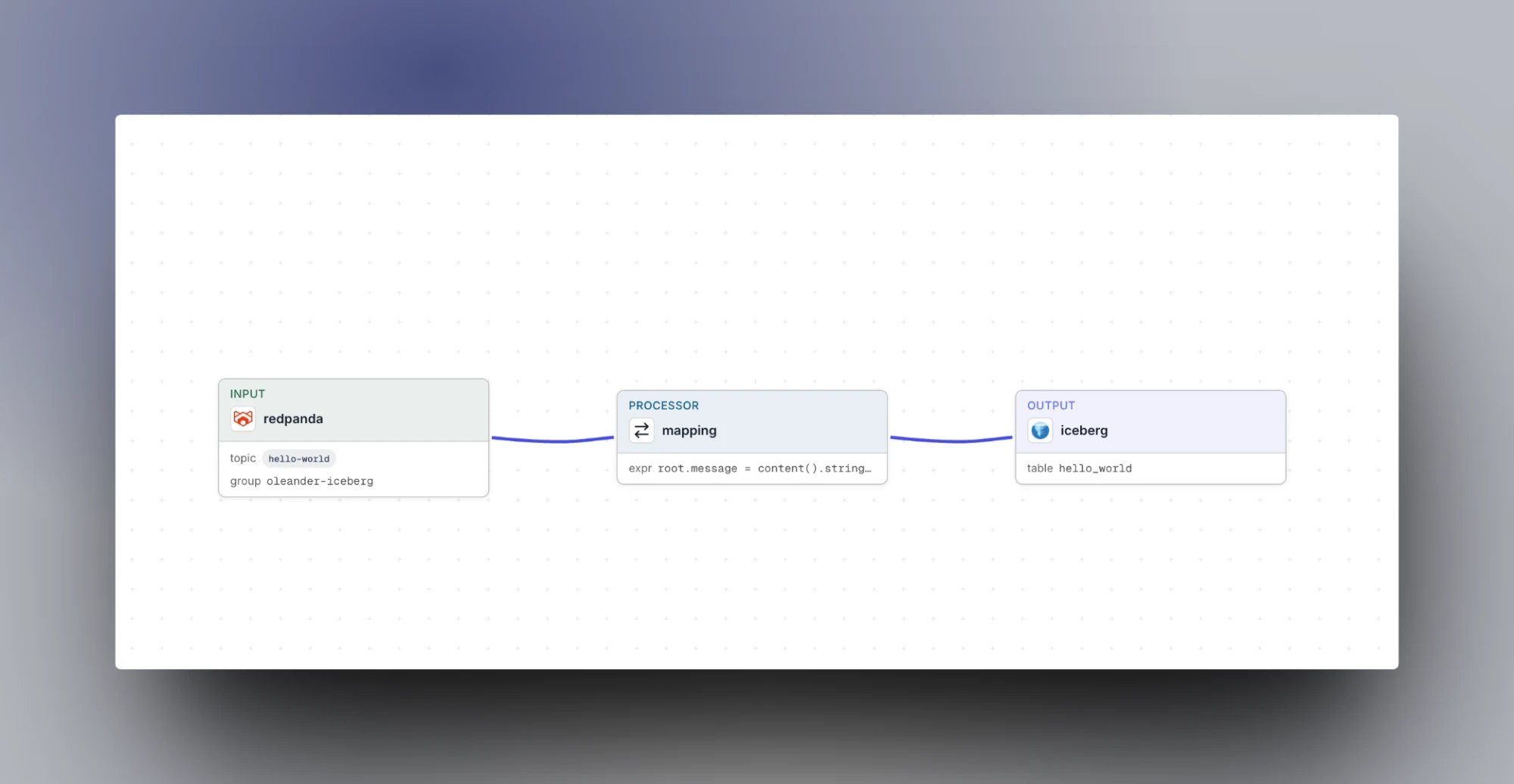
[**Redpanda**](https://www.redpanda.com/) is a Kafka-compatible streaming platform. Its [Redpanda Connect](https://docs.redpanda.com/redpanda-cloud/develop/connect/about/) pipelines include an [Iceberg output](https://docs.redpanda.com/redpanda-connect/components/outputs/iceberg/) that writes messages to Iceberg tables through a REST catalog. Point it at your oleander catalog to land topics in your lake, ready to query across compatible engines.
 ## What you need
| Value | Where to find it |
| - | - |
| **Organization ID** | [Settings → Organization](https://oleander.dev/app/settings) |
| **API key** | [Settings → API keys](https://oleander.dev/app/settings/api-keys) |
The organization ID is both the OAuth client ID and the catalog warehouse name. The API key is the OAuth client secret.
You also need a Redpanda Cloud cluster. Connect pipelines run on Serverless, Dedicated, and BYOC clusters, and the `iceberg` output is available from Redpanda Connect 4.80.0.
## Setup
1. In Redpanda, create a user for the pipeline under **Security → Users**, with ACLs to read your topic and its consumer group.
2. Open the cluster's **Secrets Store** and add three secrets:
| Secret | Value |
| - | - |
| `REDPANDA_USER` | The pipeline user's name |
| `REDPANDA_PASSWORD` | The pipeline user's password |
| `OLEANDER_API_KEY` | Your oleander API key |
3. Open **Connect**, click **Create a pipeline**, switch to the **YAML** tab, and paste this config, replacing ``:
```yaml theme={null}
input:
redpanda:
seed_brokers:
- ${REDPANDA_BROKERS}
topics:
- hello-world
consumer_group: oleander-iceberg
tls:
enabled: true
sasl:
- mechanism: SCRAM-SHA-256
username: ${secrets.REDPANDA_USER}
password: ${secrets.REDPANDA_PASSWORD}
pipeline:
processors:
# hello-world messages are plain text; the iceberg output needs JSON objects
- mapping: |
root.message = content().string()
root.topic = @kafka_topic
output:
iceberg:
catalog:
url: https://iceberg.oleander.dev/catalog
warehouse:
auth:
oauth2:
server_uri: https://oleander.dev/api/v1/oidc/token
client_id:
client_secret: ${secrets.OLEANDER_API_KEY}
scope: catalog
namespace: redpanda
table: hello_world
storage:
aws_s3:
# required by the schema but unused; oleander vends the real location and credentials
bucket: oleander
region: us-east-2
schema_evolution:
enabled: true
batching:
period: 60s
```
4. Click **Save**, then **Start pipeline**.
The `iceberg` output fields that connect it to oleander:
| Field | Value |
| - | - |
| `catalog.url` | `https://iceberg.oleander.dev/catalog` |
| `catalog.warehouse` | Your organization ID |
| `catalog.auth.oauth2.server_uri` | `https://oleander.dev/api/v1/oidc/token` |
| `catalog.auth.oauth2.client_id` | Your organization ID |
| `catalog.auth.oauth2.client_secret` | Your API key, read from a secret |
| `catalog.auth.oauth2.scope` | `catalog` |
| `namespace` | The Iceberg namespace to write into. It is created if it doesn't exist. |
| `table` | The table to write into. It is created on the first write. |
| `storage.aws_s3.region` | `us-east-2` |
| `schema_evolution.enabled` | `true`, so the output creates the table and adds columns as new fields appear |
Redpanda Connect exchanges your organization ID and API key for a short-lived catalog token, and oleander vends the storage credentials for each table. The `storage.aws_s3.bucket` field is required by the output's schema, but oleander supplies the real table location, so any value works and there are no S3 keys to configure.
The `iceberg` output writes JSON objects, inferring a column from each field. The `mapping` processor above wraps the plain-text messages from Redpanda's quickstart `hello-world` topic into `{message, topic}` objects. If your topic already carries JSON, drop the `pipeline` section.
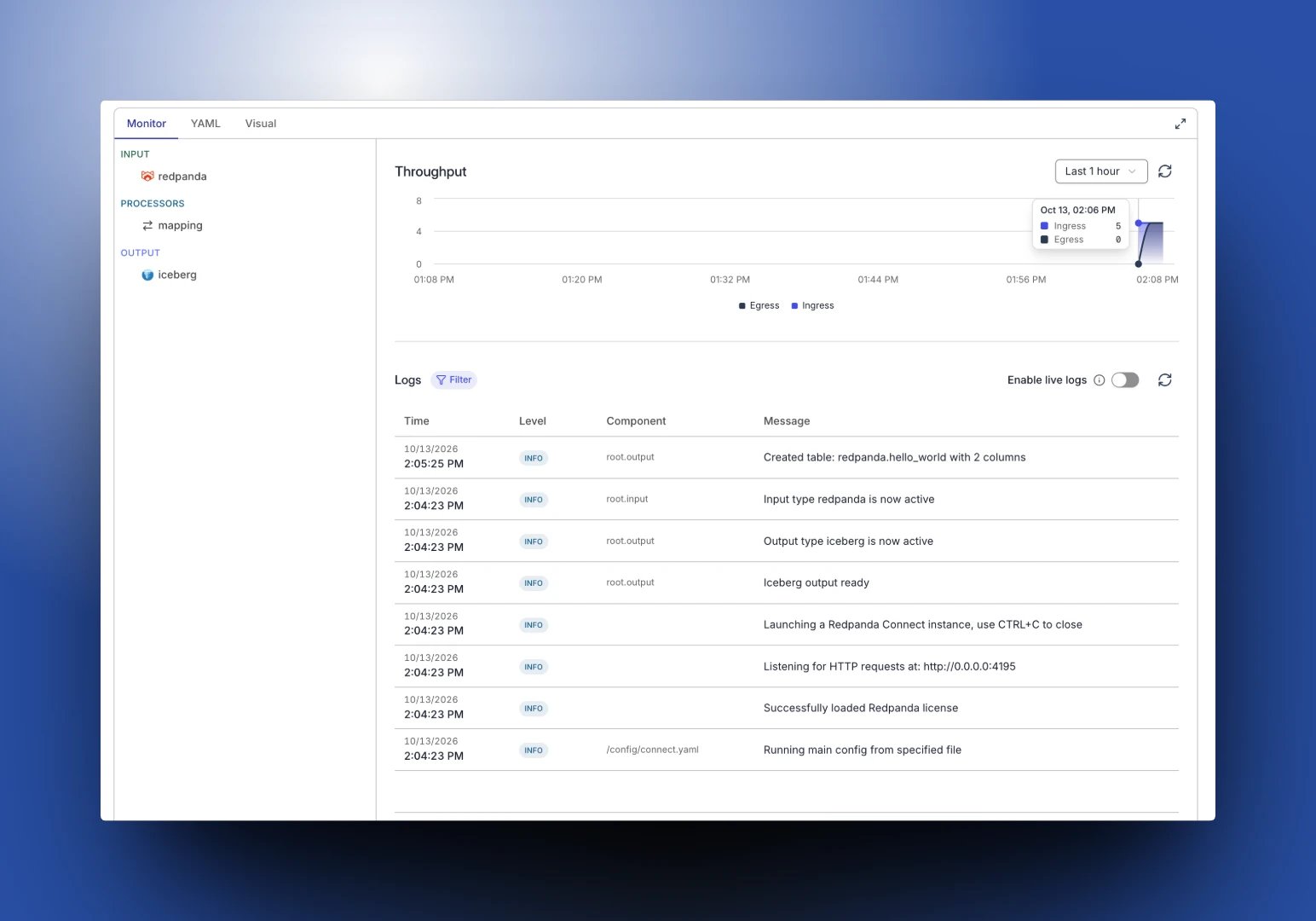
Once the pipeline starts, its logs show the output creating the table on the first write:
## What you need
| Value | Where to find it |
| - | - |
| **Organization ID** | [Settings → Organization](https://oleander.dev/app/settings) |
| **API key** | [Settings → API keys](https://oleander.dev/app/settings/api-keys) |
The organization ID is both the OAuth client ID and the catalog warehouse name. The API key is the OAuth client secret.
You also need a Redpanda Cloud cluster. Connect pipelines run on Serverless, Dedicated, and BYOC clusters, and the `iceberg` output is available from Redpanda Connect 4.80.0.
## Setup
1. In Redpanda, create a user for the pipeline under **Security → Users**, with ACLs to read your topic and its consumer group.
2. Open the cluster's **Secrets Store** and add three secrets:
| Secret | Value |
| - | - |
| `REDPANDA_USER` | The pipeline user's name |
| `REDPANDA_PASSWORD` | The pipeline user's password |
| `OLEANDER_API_KEY` | Your oleander API key |
3. Open **Connect**, click **Create a pipeline**, switch to the **YAML** tab, and paste this config, replacing ``:
```yaml theme={null}
input:
redpanda:
seed_brokers:
- ${REDPANDA_BROKERS}
topics:
- hello-world
consumer_group: oleander-iceberg
tls:
enabled: true
sasl:
- mechanism: SCRAM-SHA-256
username: ${secrets.REDPANDA_USER}
password: ${secrets.REDPANDA_PASSWORD}
pipeline:
processors:
# hello-world messages are plain text; the iceberg output needs JSON objects
- mapping: |
root.message = content().string()
root.topic = @kafka_topic
output:
iceberg:
catalog:
url: https://iceberg.oleander.dev/catalog
warehouse:
auth:
oauth2:
server_uri: https://oleander.dev/api/v1/oidc/token
client_id:
client_secret: ${secrets.OLEANDER_API_KEY}
scope: catalog
namespace: redpanda
table: hello_world
storage:
aws_s3:
# required by the schema but unused; oleander vends the real location and credentials
bucket: oleander
region: us-east-2
schema_evolution:
enabled: true
batching:
period: 60s
```
4. Click **Save**, then **Start pipeline**.
The `iceberg` output fields that connect it to oleander:
| Field | Value |
| - | - |
| `catalog.url` | `https://iceberg.oleander.dev/catalog` |
| `catalog.warehouse` | Your organization ID |
| `catalog.auth.oauth2.server_uri` | `https://oleander.dev/api/v1/oidc/token` |
| `catalog.auth.oauth2.client_id` | Your organization ID |
| `catalog.auth.oauth2.client_secret` | Your API key, read from a secret |
| `catalog.auth.oauth2.scope` | `catalog` |
| `namespace` | The Iceberg namespace to write into. It is created if it doesn't exist. |
| `table` | The table to write into. It is created on the first write. |
| `storage.aws_s3.region` | `us-east-2` |
| `schema_evolution.enabled` | `true`, so the output creates the table and adds columns as new fields appear |
Redpanda Connect exchanges your organization ID and API key for a short-lived catalog token, and oleander vends the storage credentials for each table. The `storage.aws_s3.bucket` field is required by the output's schema, but oleander supplies the real table location, so any value works and there are no S3 keys to configure.
The `iceberg` output writes JSON objects, inferring a column from each field. The `mapping` processor above wraps the plain-text messages from Redpanda's quickstart `hello-world` topic into `{message, topic}` objects. If your topic already carries JSON, drop the `pipeline` section.
Once the pipeline starts, its logs show the output creating the table on the first write:
 ## Querying the data
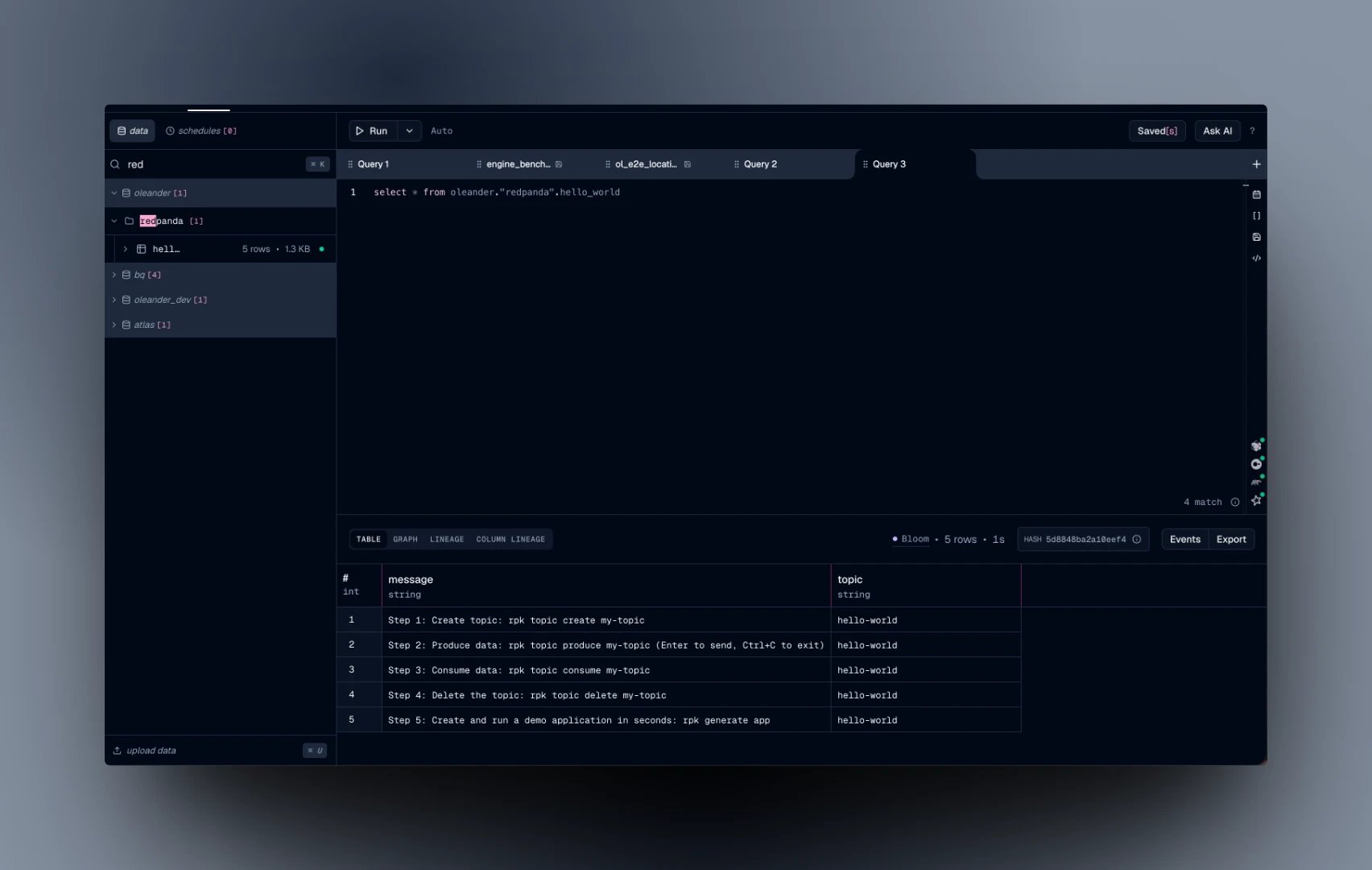
Query the table like any other table in your catalog:
```sql theme={null}
SELECT * FROM oleander.redpanda.hello_world;
```
## Querying the data
Query the table like any other table in your catalog:
```sql theme={null}
SELECT * FROM oleander.redpanda.hello_world;
```
 Every batch is an Iceberg commit, and `batching.period` sets how often one lands. A longer period means fewer, larger files. For long-running pipelines, schedule [Iceberg maintenance](/platform/storage/tables#table-health-and-maintenance) to compact small files, expire old snapshots, and keep query times flat.
For keyed topics, the output can upsert with `row_operation` and `identifier_fields`. Prefer `merge_strategy: copy-on-write` there: the default `merge-on-read` writes equality deletes, which slow down reads until maintenance compacts them.
This guide uses Redpanda Connect, not Redpanda's built-in Iceberg Topics. Iceberg Topics only runs on BYOC and BYOVPC clusters and writes its data files to Redpanda's own bucket, so it can't use the storage your oleander catalog provides.
This documentation is built and hosted on [Mintlify](https://mintlify.com), a developer documentation platform.
Every batch is an Iceberg commit, and `batching.period` sets how often one lands. A longer period means fewer, larger files. For long-running pipelines, schedule [Iceberg maintenance](/platform/storage/tables#table-health-and-maintenance) to compact small files, expire old snapshots, and keep query times flat.
For keyed topics, the output can upsert with `row_operation` and `identifier_fields`. Prefer `merge_strategy: copy-on-write` there: the default `merge-on-read` writes equality deletes, which slow down reads until maintenance compacts them.
This guide uses Redpanda Connect, not Redpanda's built-in Iceberg Topics. Iceberg Topics only runs on BYOC and BYOVPC clusters and writes its data files to Redpanda's own bucket, so it can't use the storage your oleander catalog provides.
This documentation is built and hosted on [Mintlify](https://mintlify.com), a developer documentation platform.